
Downloads for Windows
We suggest the following mirror site for your download:
Windows 64 bit installer

|
https://dlcdn.apache.org/[...]/ApacheDirectoryStudio-2.0.0.v20210717-M17-win32.win32.x86_64.exe | [ASC] [SHA512] |
Windows 64 bit zip archive
|
|
https://dlcdn.apache.org/[...]/ApacheDirectoryStudio-2.0.0.v20210717-M17-win32.win32.x86_64.zip | [ASC] [SHA512] |
We encourage you to verify the integrity of the downloaded file using:
- the ASC file (OpenPGP compatible signature) with the KEYS file (code signing keys used to sign the product)
- the SHA256 or SHA512 files (checksum).
Installation
 |
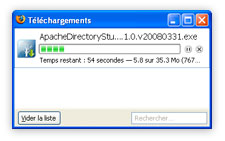 |
Click on the link above to download Apache Directory Studio for Windows. | |
 |
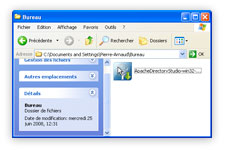 |
Double-click on the installer to open it. | |
 |
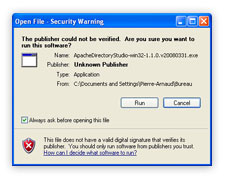 |
You may be prompted to confirm that you are sure you want to open the installer. Answer Run if such a popup is displayed. | |
 |
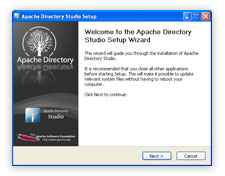 |
Follow the instructions of the installer to complete the installation. |
Requirements
Apache Directory Studio requires at least:
- a recent Windows version.
- Java 11 or later, we recommend AdoptOpenJDK.
Verify the integrity of the file
The PGP signatures can be verified using PGP or GPG. First download the KEYS as well as the asc signature file for the relevant distribution. Then verify the signatures using:
$ pgpk -a KEYS
$ gpgv ApacheDirectoryStudio-2.0.0.v20210717-M17-win32.win32.x86_64.exe.asc
$ pgp -ka KEYS
$ gpg ApacheDirectoryStudio-2.0.0.v20210717-M17-win32.win32.x86_64.exe.asc ApacheDirectoryStudio-2.0.0.v20210717-M17-win32.win32.x86_64.exe
$ gpg --import KEYS
$ gpg --verify ApacheDirectoryStudio-2.0.0.v20210717-M17-win32.win32.x86_64.exe.asc ApacheDirectoryStudio-2.0.0.v20210717-M17-win32.win32.x86_64.exe
Alternatively, you can verify the checksums of the files (see the How to verify downloaded files page).